
HTTP Relay & Audit
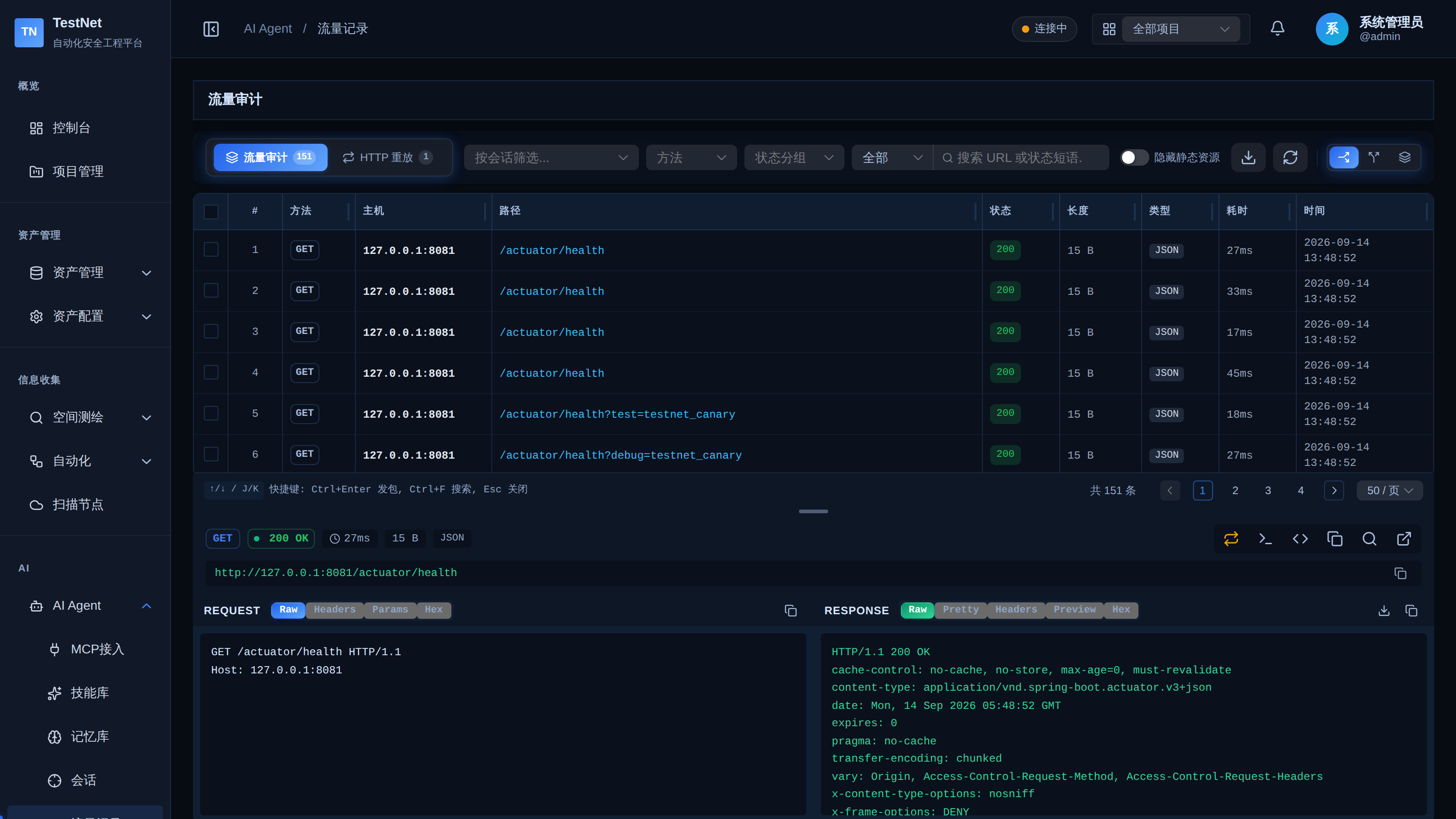
In modern automated and AI-assisted penetration testing, deterministic traffic recording and auditability are critical for compliance and reproducibility. TestNet features a built-in, enterprise-grade HTTP Traffic Relay and Auditing Hub. The relay intercepts and dispatches every HTTP/HTTPS probe from AI agents, records headers, bodies, status codes, and round-trip latencies, and supports one-click export of standard HAR 1.2 traffic archives.
Core Capabilities
- Single-Step Redirect Tracing: Unlike conventional HTTP clients that automatically follow redirects, the relay captures
301/302/303/307/308responses step-by-step, preserving every intermediate bounce and state. - Full Raw Retention (Optional Masking): The relay stores complete raw headers and credentials by default (
store_raw=true) for loss-free audit replay. To prevent leakage, setstore_rawtofalseand the system will mask sensitive headers such asAuthorizationandCookiebefore storing. - Intelligent Response Chunking: Large response bodies can be sliced with
offset/limit, filtered via regexgrep, or converted to Markdown summaries to prevent overflowing AI LLM contexts. - Side-by-Side Response Diff: Compare any two HTTP records directly within the web UI with visual diff highlighting—invaluable for detecting unauthorized data leaks during access control testing.
- Standard HAR 1.2 Export: Export full traffic sessions into standard
.hararchives fully compatible with Chrome DevTools, Burp Suite, and OWASP ZAP.
Web UI Operations
Navigate to "AI" → "HTTP Records" in the left sidebar.
1. Traffic Filtering & Search
- Keyword Query: Search across URLs, HTTP methods, and status codes.
- Engagement Filter: Constrain records to a specific active or historical Engagement.
- Status Codes: One-click quick filters for
2xx Success,3xx Redirection,4xx Client Error, and5xx Server Error.
2. Record Inspection Modal
Click any row or select "View Details":
- Overview: Full method, destination URL, status code, latency (ms), and response size metadata.
- Headers Tab: Side-by-side key-value formatting of Request and Response headers.
- Body Tab: Syntax-highlighted viewer with automatic formatting for JSON, HTML, and XML; Hex and image preview for binary payloads.
3. Response Diff Comparison
When testing for IDOR or parameter pollution:
- Select two checkboxes corresponding to the baseline and test requests.
- Click "Diff Comparison" in the toolbar.
- Review the side-by-side view with green highlights for additions and red highlights for deletions.
4. Exporting HAR 1.2 Archives
- Multi-select desired traffic records or choose "Select All".
- Click "Export HAR" to download the timestamped
.harfile. - In Burp Suite, import via
Engagement tools -> Import -> HAR filedirectly into Repeater and Proxy for manual follow-up verification.
Native MCP Integration Tools
External AI agents can invoke relay capabilities through the following facade tools (the legacy atomic names testnet_http_relay, etc. remain backward-compatible):
| Facade Call | Description | Key Arguments |
|---|---|---|
testnet_http(action="relay") | Execute a single HTTP request and persist it to the audit log | method, url, headers, body, engagement_id, format, grep_regex, credential_id |
testnet_web_recon(action="browser_fetch") | Server-side page fetch with DOM, forms, links, scripts, and frontend framework fingerprints | url, extract, timeout, headers |
testnet_http(action="batch") | High-concurrency path/parameter probing (supports | base_url+paths, or urls, or url_pattern+payloads; concurrency, timeout, filter_status |
testnet_http(action="view_body") | Chunked viewer for full stored response bodies | record_id, offset, limit, grep_regex |
testnet_http(action="diff") | Structured JSON difference between two responses | record_id_a+record_id_b, or request_a+request_b |
Related Documentation
- Engagements — organize traffic traces and decision chains per engagement
- Credentials — credential injection in relayed requests and matrix testing
- MCP Overview — how AI Agents connect to TestNet