
MCP Overview
TestNet implements the MCP (Model Context Protocol), enabling AI assistants such as Claude Code, Cursor, Windsurf, and Codex to directly leverage TestNet platform capabilities.
What is MCP?
MCP is an open standard protocol released by Anthropic for integrating AI assistants with external tools and systems. Through MCP, AI assistants can:
- Call Tools: Perform asset queries and mutations, trigger workflow orchestration, query scan logs, conduct HTTP penetration testing, and search cyberspace
- Access Resources: Read project lists, workflow lists, and tool specifications
- Use Prompts: Utilize pre-defined prompt templates to aid security triage and reconnaissance planning
TestNet MCP Capabilities
The platform provides 14 core facade MCP tools, 5 MCP Resources, and 5 Prompt Templates for external AI agents. All facade tools remain permanently exposed in tools/list; each covers a complete business domain through an action parameter. The 57 legacy atomic tool names stay backward-compatible (still callable via tools/call) but are no longer listed in tools/list.
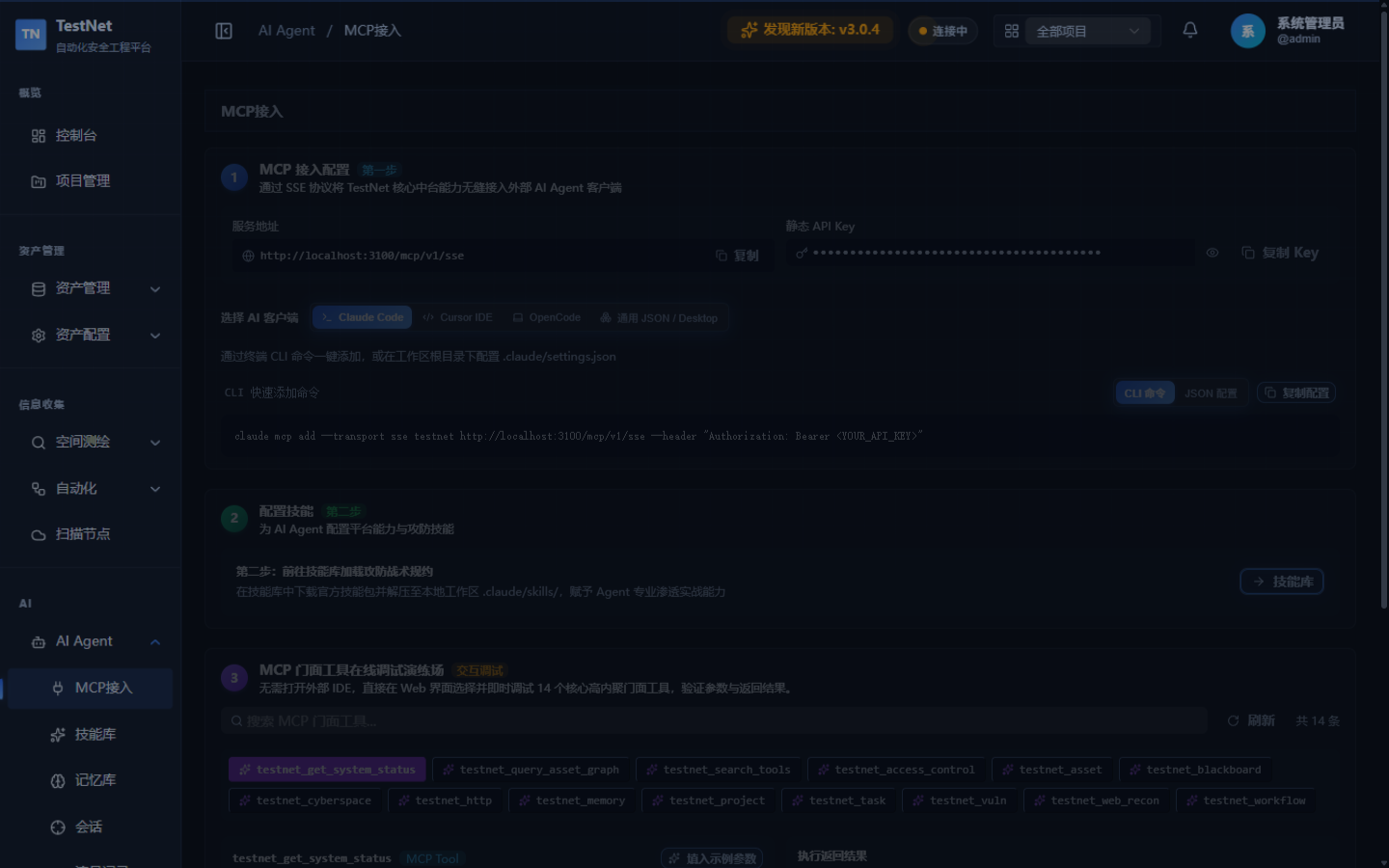
The 14 Core Facade Tools at a Glance
| # | Tool Name | Domain | Description |
|---|---|---|---|
| 1 | testnet_asset | Asset hub | Full CRUD, global search, and automatic tag matching across 8 asset types (company/domain/sub_domain/ip/port/web/api/vul) |
| 2 | testnet_query_asset_graph | Asset topology | Project-level asset topology graph and risk statistics (statsOnly overview mode supported) |
| 3 | testnet_project | Project context | Project container management (idempotent creation) |
| 4 | testnet_blackboard | Engagements & decisions | Engagement lifecycle, decision tree recording, and state blackboard governance |
| 5 | testnet_memory | Persistent memory | Cross-session Markdown note read/write and category management |
| 6 | testnet_search_tools | Tool discovery | Intent-based search for scanning tools and workflows (mandatory before scanning) |
| 7 | testnet_workflow | Workflow orchestration | DAG workflow trigger, tracking, cancellation, and template discovery |
| 8 | testnet_task | Task dispatch | Single-tool scan dispatch, batch await, log streams, chunked output reading, and cancellation |
| 9 | testnet_get_system_status | Cluster health | Probe cluster status and dispatch queue readiness |
| 10 | testnet_http | HTTP penetration | Precision relayed requests with audit, response diffing, batch probing, and chunked body reading |
| 11 | testnet_web_recon | Web recon | Headless DOM parsing, hidden parameter mining, and frontend JS static analysis |
| 12 | testnet_access_control | Credentials & authz | Target credential custody (no plaintext echo) and multi-identity authz matrix testing |
| 13 | testnet_vuln | Vulnerability management | Severity-filtered search, triage state transitions, and false-positive deletion |
| 14 | testnet_cyberspace | Cyberspace mapping | Exposure search via FOFA/Hunter/Quake/Shodan engines plus quota monitoring |
5 MCP Resources
| Resource URI | Content |
|---|---|
testnet://projects | Project list |
testnet://workflows | Workflow list |
testnet://tools | Tool definitions list |
testnet://engagements | Engagement list |
testnet://memory | AI Agent Markdown memory notes |
5 MCP Prompt Templates
| Prompt Name | Function |
|---|---|
asset_inventory_summary | Asset inventory summary |
workflow_selector | Workflow recommendation selector |
vul_triage | Vulnerability triage and remediation advice |
recon_plan | Asset reconnaissance plan generation |
mock_test_guide | Mock test writing guide |
Usage Scenarios
Scenario 1: AI assistant performs full asset inventory and graph analysis
User: Analyze all externally exposed assets under project proj_001 and check for unfixed high-severity vulnerabilities

Claude: Let me query the TestNet asset graph and vulnerabilities...
[calls testnet_query_asset_graph(projectId="proj_001", statsOnly=true)]
[calls testnet_vuln(action="search", projectId="proj_001", fixStatus="OPEN", severity="HIGH")]

The project currently owns 2 root domains, 15 subdomains, 8 open port services, and 2 unfixed high-severity vulnerabilities...
Scenario 2: AI assistant runs an automated scanning workflow
User: Run the fully automated domain reconnaissance workflow against example.com

Claude: Sure, let me confirm the available workflows first and then trigger it for you...
[calls testnet_search_tools(query="domain reconnaissance")]
[calls testnet_workflow(action="run", workflowId="domain-recon-pipeline", target="example.com", assetType="DOMAIN", projectId="proj_001")]

Workflow started, run ID: run_abc123...
Scenario 3: AI assistant assists HTTP penetration testing with audit evidence
User: Test whether https://api.example.com/user/profile is vulnerable to IDOR

Claude: I will use the TestNet HTTP facade for response diffing and record the conclusion into the decision chain...
[calls testnet_http(action="diff", request_a={url: "https://api.example.com/user/profile?id=1001", headers: {Authorization: "Bearer token_a"}}, request_b={url: "https://api.example.com/user/profile?id=1002", headers: {Authorization: "Bearer token_a"}})]
[calls testnet_blackboard(action="log_decision", phase="exploit", target="https://api.example.com/user/profile", rationale="IDOR confirmed: response body contains the user's phone number and address")]
MCP Transports & Endpoints
TestNet MCP supports standard SSE Streaming, JSON-RPC 2.0 Transport, and REST API Extensions:
| Endpoint | Method | Description |
|---|---|---|
/mcp/v1 or /mcp/v1/sse | GET | MCP SSE streaming transport endpoint (initial handshake emits endpoint event) |
/mcp/v1/message | POST | MCP JSON-RPC 2.0 message handler (initialize, tools/list, tools/call, etc.) |
/mcp/v1/info | GET | Retrieve MCP server runtime configuration, version, and health status |
/mcp/v1/tools | GET | List tool definitions via REST |
/mcp/v1/tools/call | POST | Execute a tool via REST |
/mcp/v1/resources | GET | List available resources |
/mcp/v1/resources/read | GET | Read resource content |
/mcp/v1/prompts | GET | List prompt templates |
/mcp/v1/prompts/get | POST | Render a prompt template |
/mcp/v1/skill | GET | Retrieve TestNet platform Skill specification (Markdown) |
Related Documentation
- Claude / Cursor Integration — Configuration guide for Claude Code, Cursor, and Windsurf
- AI Skill Center — manage SKILL.md knowledge cards injected into AI Agents
- AI Memory Management — review persistent memories accumulated across sessions