
License Management
TestNet production environment requires a valid license file. Please follow the steps below to quickly obtain and activate the system:
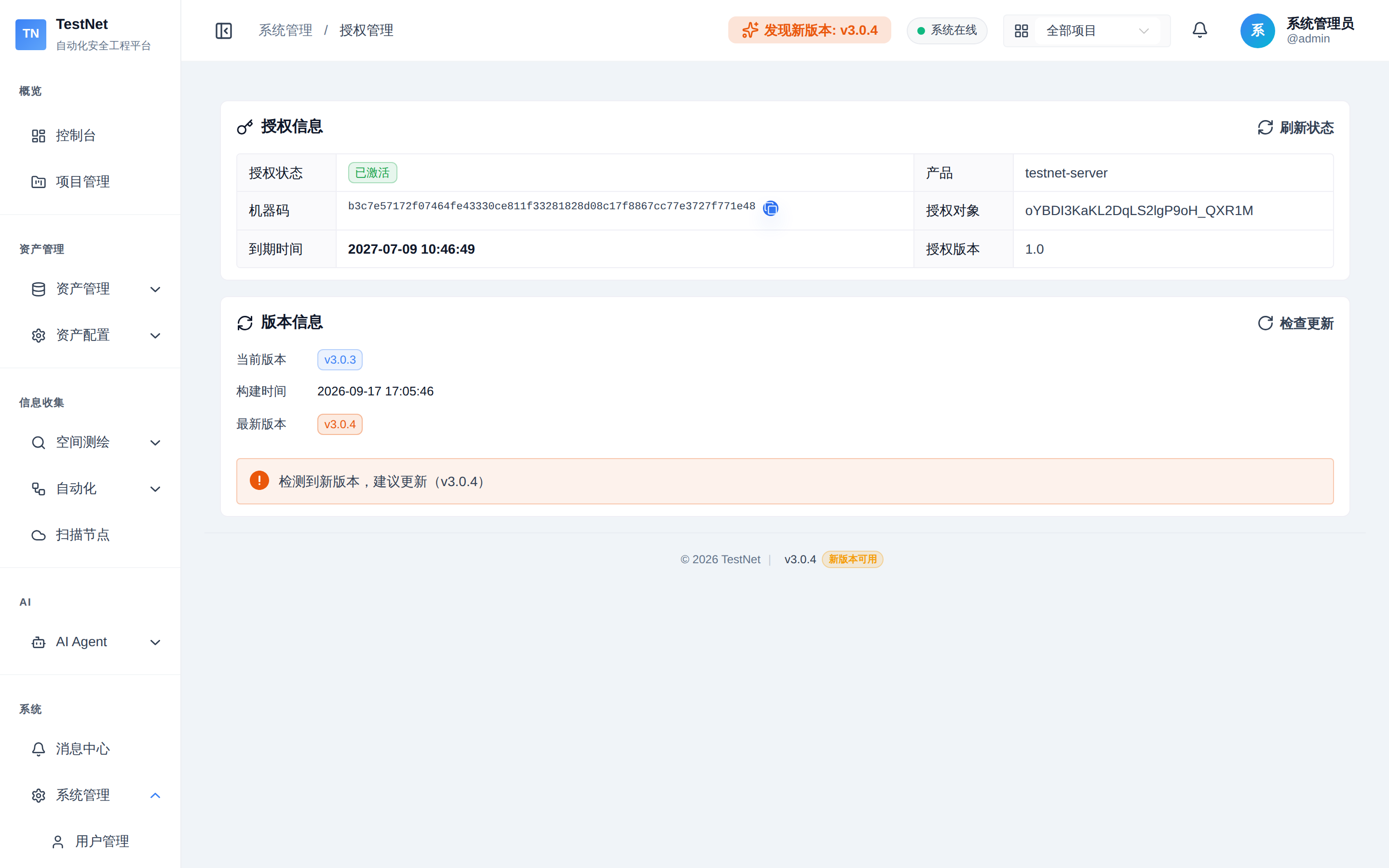
Step 1: Obtain Machine ID
- After platform deployment, log in using the administrator account.
- Go to the left menu: "System" → "License".
- Copy the Machine ID displayed on the page (computed based on server hardware).
Step 2: Follow WeChat Official Account to Get License
- Search and follow the WeChat Official Account: "Anlian Security" (暗链安全).
- Send your copied Machine ID directly in the chat box (format:
machine-id: <YOUR_MACHINE_ID>or just send the ID string directly). - The chatbot will automatically verify and reply in real-time with the generated license content (JSON format).
- Create a new local text file named
license.lic, copy the full JSON content from the WeChat reply, and paste it into the file.
Step 3: Activate in Web Interface
- Go back to TestNet's "System" → "License" page.
- Click the "Upload License File" button.
- Select your local
license.licfile and click upload. - The system will instantly verify and activate the license!
License Validity & Renewal
TestNet license files include an expiration date. After expiration, the system locks down entirely (all APIs outside the whitelist return "System not activated" — assets and tasks become inaccessible; only sign-in and license management remain usable).
- Check Expiry: View the current license expiration date on the "License Management" page.
- Expiration Reminders: 30 days before expiration, the "License Management" page shows an "Expiring soon" warning badge — renew promptly.
- Renewal Process: Before expiration, repeat Steps 1–3 above to obtain and upload a new license file. The update takes effect immediately without downtime.
Client Node Behavior While Inactive
While the license is inactive (or expired), scanning nodes cannot register with the server, but the four core containers are unaffected. To avoid a rapid client restart loop:
- On receiving "system not activated" (HTTP 403, business code
40301) from the server, both the built-in and standalone clients stop fast-restarting and switch to a low-frequency retry (once every 3 minutes); - After activation, the client registers and comes online automatically, with no manual intervention;
- If the server instead reports a "secret mismatch" (any other 403), the client still fails fast, making it easy to distinguish license issues from configuration issues.
TIP
See Troubleshooting · client restarting before license activation for details.
Docker Deployment & Machine ID Stability
License files are bound to the server's machine ID. In Docker deployments, container recreation (e.g., docker compose down && up) may cause the machine ID to change, invalidating the license.
Solution: Mount the host machine ID file (read-only) in docker-compose.yml for the server container to ensure a stable machine ID across rebuilds:
services:
  testnet-server:
    volumes:
      - /etc/machine-id:/etc/machine-id:ro
Important
Without this mount, each container rebuild generates a new machine ID, invalidating the existing license. You would need to obtain a new license.
FAQ
License upload shows "Machine ID mismatch"
- Verify the uploaded license corresponds to the current server's machine ID
- For Docker environments, confirm
/etc/machine-idis mounted as described above - If server hardware changes (e.g., motherboard or NIC replacement), the machine ID will change and a new license is required
License has expired
- After expiration, the system locks down entirely (APIs return "System not activated"). Existing data is not lost
- Follow the activation process above to obtain and upload a new license to restore full functionality
Do multiple nodes require multiple licenses?
- Server License: Each server instance requires its own license file (bound to its machine ID)
- Scanning Nodes: Client nodes do not require individual licenses; they are managed by the server
Related Documentation
- System Setup & Activation — Machine ID mount and deployment configuration
- FAQ — Deployment troubleshooting